 |
|
|
|
| Cursus CSS |
|
Index - vorige |
| |
|
|
|
| Les 14 |
|
|
| |
| Tabellen |
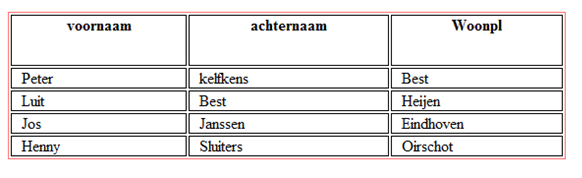
Een tabel bestaat uit een aantal regels en kolommen.
Binnen HTML heet de tag <table> .. </table>.
De bijbehorende tags zijn <tr> en <td>.
Indien elke tabelregel 4 datacellen heeft, dan ontstaat er een tabel van twee regels en 4 kolommen.
Zie voorbeeld: |
 |
<table>
<tr>
<th>voornaam</th>
<th>achternaam</th>
<th class="savings">Woonpl</th>
</tr>
<tr>
<td>Peter</td>
<td>kelfkens</td>
<td>Best</td>
</tr>
<tr>
<td>Luit</td>
<td>Best</td>
<td>Heijen</td>
</tr>
<tr>
<td>Jos</td>
<td>Janssen</td>
<td>Eindhoven</td>
</tr>
<tr>
<td>Henny</td>
<td>Sluiters</td>
<td>Oirschot</td>
</tr>
</table> |
| |
| Resultaat: |
 |
| |
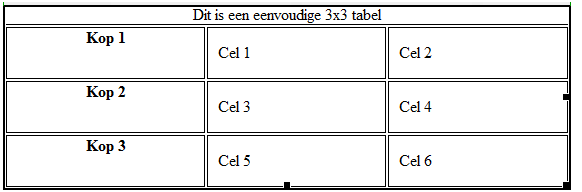
Nog een voorbeeld: |
<TABLE>
<CAPTION>Dit is een eenvoudige 3x3 tabel</CAPTION>
<TR id="rij1">
<TH>Kop 1 <TD>Cel 1 <TD>Cel 2
<TR id="rij2">
<TH>Kop 2 <TD>Cel 3 <TD>Cel 4
<TR id="rij3">
<TH>Kop 3 <TD>Cel 5 <TD>Cel 6
</TABLE> |
En het resultaat met de zelfde CSS: |
 |
| Tot slot de basisvorm van een website |
| De html: |
<body>
<div id="kop">
<img src="..uw_logo.jpg" alt="logo" width="300" height="100"></div>
<!-- kop -->
<h1> Welkom op de website van... </h1>
<ul id="navigatie">
<li id= "huidig"><a href="home.html"> home</a></li>
<li><a href="#"> Link01</a></li>
<li><a href="#"> Link02</a></li>
<li><a href="#"> Link03</a></li>
<li><a href="home.html"> Link04</a></li>
</ul>
<div id="navigatievert">
<ul>
<li>Item01</li>
<li>Item02</li>
<li> Item03</li>
<li> Item04</li>
</ul>
</div> <!-- navigatie -->
<div id="inhoud">
<p>uw tekst</p>
<p> </p>
</div> <!-- inhoud -->
<div id= "footer" >
<p> copyright 2010</p>
</div> /* einde footer*/
</body>
</html> |
| |
| En de CSS: |
<style type="text/css">
body{
background:#ff9 url(kleurverloop groen.jpg) top left repeat -y;
color:black;}
h1{text-align:center;}
#navigatie{
list-style:none; /*bullets weg */
margin:0;
padding:0; /* komt bij de li's */
width:80%;
}
#navigatie li {
text-align: center;
border-style : solid none solid none;
border-width : 1px;
border-color : maroon; /* achtergrondkleur */
width : 20%; /* toevoegen voor Internet Explorer */
padding: 5px 0px 3px 0;
background:orange;
float:left;
}
#navigatie a:hover {
border-color : #c60;
background:#008000;}
.huidig {background:#008000}
#navigatievert li {
text-align: center;
border-style : solid none solid none;
border-width : 1px;
border-color : maroon; /* achtergrondkleur */
width : 10em; /* toevoegen voor Internet Explorer */
padding: 5px 0px 3px 0;
background:green;
}
#navigatievert a {
text-decoration: none;
}
#navigatievert {
background:#cc9; /*groen*/
float:left;
padding:5px;
width:175px;}
#inhoud {margin:0 0 0 200px; padding:2px 10px 2px 25px;}
#footer { height:auto;text-align:center; background: #FFC; clear:both; }
</style>
</head> |
| |
| |
| Index - vorige |


